
Problems and fixes
Why is my business not showing on Google Maps? A 7-point check for South African businesses
Why is my business not showing on Google Maps? A check for after verification, a shop that isn't coming up, and a listing only you can see.
Published · Updated
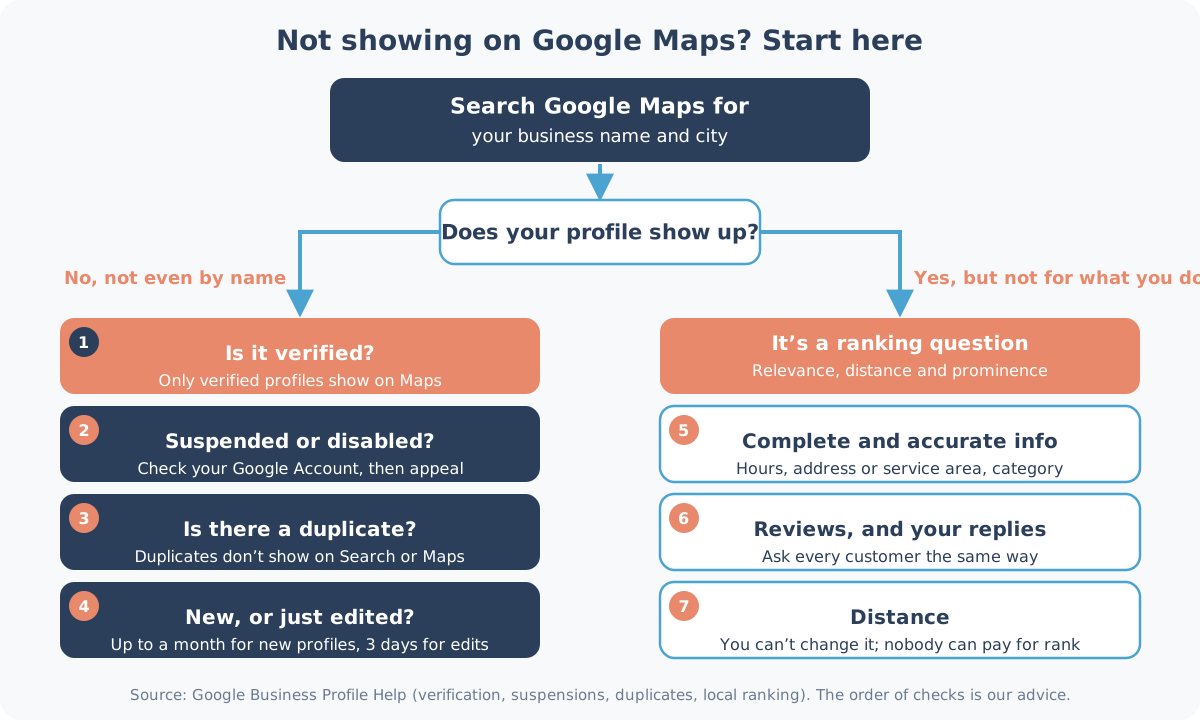
Why is my business not showing on Google Maps? Either your profile doesn't show at all, even when someone types your exact name, or it shows for your name but not when people search for what you do. The first is a profile problem. The second is ranking, which you work on over time.
If you searched 'why am I not showing up on Google' or 'why is my shop not coming up', this is the same check: your shop on Google Maps and in the local results, not your website in Search.
Start with one search
Google's help page on finding your business suggests searching Google Maps for your business name and city. Do that first, on a device you don't use to manage the profile.
- Nothing, even by name: checks 1 to 4, then the sections on verification and a listing only you can see.
- Shows by name, not for what you do: checks 5 to 7.
1. Is the profile verified?
"Only verified businesses can show their business info on Maps and Search." If you never finished verification, the profile will not show to the public, even if it looks complete when you are signed in.
The verification methods "are automatically determined by Google and can't be changed." Options include a phone or text, an email, a live video call, or a postcard. Reviews "take up to 5 business days", and "On rare occasions, reviews may take longer." While you wait for a postcard, do not edit the name, address or category: "Do not edit your business name, address, or category on your Business Profile. If you do, the code we sent you won't work."
Already verified? See the after-verification section below.
2. Has the profile been suspended?
If a profile breaks Google's guidelines, "it becomes disabled or suspended and won't show to other users on Google until you resolve the issue." You'll get a notification in the Google Account that manages it. Extra words in the name are one reason: unnecessary information in the name "could result in the suspension of your Business Profile."
To appeal, open Google's appeals tool, select the decision, and follow the steps. Evidence includes official business registration, a business licence, tax certificates and utility bills. Check that the name and address match the profile. Don't set up a second profile for the same business. Appeals "can only be submitted once."
3. Is there a duplicate?
"You can have only one Business Profile for each business." A duplicate "won't show on Google Search or Maps." Google lists three reasons: an existing verified profile, the same address, or different services at the same location.
If someone else already has a verified profile for your business, "you can request access from the current owner." They have 3 days to respond. "The option to claim a profile isn't always available." If you see two listings for yourself, start with Google's duplicate guide.
In a Sea Point snapshot of 20 dental listings, at least 3 practices appeared under more than one listing (same phone or address).
4. Is the profile new, or was it just edited?
"Rankings for new businesses can take up to a month to appear in search results", and edits "can take up to 3 days to appear." If you opened yesterday, or just changed the name, address, hours or category, wait those windows first. If it was your hours, here's how to change business hours on Google the right way.
Google may also apply a public suggested edit. If you're notified, you have 4 days to accept or reject it.
5. Does it show by name, but not for what you do?
If you show up by exact name, the profile is working. Google's page on local ranking says "Local results are mainly based on relevance, distance, and popularity", and "there's no way to request or pay for a better local ranking on Google."
"Businesses with complete and accurate info are more likely to show up in local search results." "If your business info isn't accurate, your Business Profile might not show up for relevant searches in your area." For the category, "Choose the fewest number of categories it takes to describe your overall core business." If you go to your customers, "you should hide your business address."
6. What do the reviews look like?
Google includes reviews in "prominence": "how many websites link to your business and how many reviews you have." "More reviews and positive ratings can help your business", and when you reply to your reviews, "it shows that you value their feedback." Don't buy reviews, or offer a discount for one: that's against Google's rules. Our guide to getting Google reviews covers how to ask.
A counter review stand by the till helps too: customers open your review page with a tap of the phone. When the reviews come in, we can answer them for you.
7. How far is the customer?
"Distance refers to how far each business is from the customer who's searching." Open Maps, search for what you do from a customer's typical location, and look at your pin. If it's on the wrong building, get the address and pin right, then wait up to 3 days for the edit.
Why is my business not showing up after verification?
Did it finish? Reviews "take up to 5 business days", sometimes longer, and "When your business is verified, you'll get a confirmation email." If Get verified is back on your profile, "it means Google couldn't completely verify your business." Try again. After a video, Review issues means "your video wasn't accepted": open it and follow the steps.
A notice? A disabled or suspended profile "won't show to other users on Google until you resolve the issue." That's check 2.
A ranking wait? "Rankings for new businesses can take up to a month to appear in search results." Showing by name but not for what you do is checks 5 to 7. Still nothing by name: checks 2 to 4.
Why is my shop not coming up on Google?
This is about a physical shop on Google Maps and in the local results, not an online store's website in Search. Search Maps for your shop name and city. Nothing, even by name: checks 1 to 4. The shop shows by name but not for what you sell: checks 5 to 7.
It's only visible to me
"Only verified businesses can show their business info on Maps and Search", and a disabled or suspended profile "won't show to other users." Search for your exact name and city in a private window, or while signed out. If you can only see the listing when signed in as the owner, start at checks 1 to 3, not at ranking.
Quick checklist
| What you see | Likely cause | What to do |
|---|---|---|
| Nothing, even by name | Not verified, suspended, or a duplicate | Checks 1 to 3 |
| Verified, still nothing | Unfinished verification, or a notice | Get verified or Review issues, then 2 and 3 |
| Shop isn't coming up | Same two paths | Search Maps for the shop name |
| Only you can see it | Not verified, or suspended | Search signed out, then 1 to 3 |
| Shows by name only | Relevance, reviews, or distance | Checks 5 to 7 |
| Just created or edited | Google's wait | Up to a month, or 3 days for an edit |
| Wrong address or pin | A profile error | Correct it, wait up to 3 days |
Want a second pair of eyes?
Our Snapshot Audit is R1,990: five clear written gaps in five business days, or you don't pay. See our public prices.
Our Google profile health check is 18 yes or no questions and a score out of 100: no cost, no sign-in, our own checklist, not Google's, and it does not promise a ranking.
WhatsApp Shaun on 075 330 9812, or use the contact form. We work across South Africa, from Durban to Cape Town.
Sources checked on 15 October 2026, and again on 12 November 2026: Find your Business Profile, Verify your Business Profile, Fix a suspended or disabled profile, Guidelines, Improve your local ranking, and Resolve duplicate profiles. What changed on 18 November 2026: new sections on after verification, a shop that isn't coming up, and a listing only you can see, plus a link to our no-cost health check.